Based on one lookup:
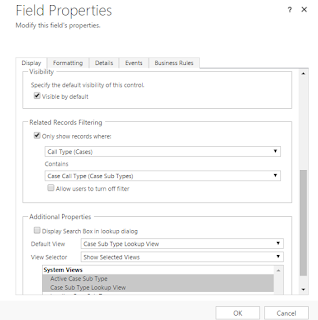
Right click on field and go to change properties.
Select the checkbox and select the drop down in "Related Records Filtering" Section
Based on two lookup:
Call the function onchange of second lookup and onload of form.
It will add filter for third lookup.
Lookup1: ccs_category
Lookup2:ccs_casetype
Lookup3:ccs_subtype
Javascript Function:
function filterSubtype() {
// add the event handler for PreSearch Event
Xrm.Page.getControl("subtype").addPreSearch(subtype_addFilter);
}
function subtype_addFilter() {
//find contact contains this @example.com
var categoryId = Xrm.Page.getAttribute("category").getValue() != null ? Xrm.Page.getAttribute("category").getValue()[0].id : null;
var caseTypeId = Xrm.Page.getAttribute("casetype").getValue() != null ? Xrm.Page.getAttribute("casetype").getValue()[0].id : null;
//create a filter xml
var filter = "<filter type='and'><condition attribute='category' operator='eq' value='" + categoryId + "' /><condition attribute='casetype' operator='eq' value='" + caseTypeId + "' /></filter>";
//add filter
Xrm.Page.getControl("subtype").addCustomFilter(filter);
}
Right click on field and go to change properties.
Select the checkbox and select the drop down in "Related Records Filtering" Section

Based on two lookup:
Call the function onchange of second lookup and onload of form.
It will add filter for third lookup.
Lookup1: ccs_category
Lookup2:ccs_casetype
Lookup3:ccs_subtype
Javascript Function:
function filterSubtype() {
// add the event handler for PreSearch Event
Xrm.Page.getControl("subtype").addPreSearch(subtype_addFilter);
}
function subtype_addFilter() {
//find contact contains this @example.com
var categoryId = Xrm.Page.getAttribute("category").getValue() != null ? Xrm.Page.getAttribute("category").getValue()[0].id : null;
var caseTypeId = Xrm.Page.getAttribute("casetype").getValue() != null ? Xrm.Page.getAttribute("casetype").getValue()[0].id : null;
//create a filter xml
var filter = "<filter type='and'><condition attribute='category' operator='eq' value='" + categoryId + "' /><condition attribute='casetype' operator='eq' value='" + caseTypeId + "' /></filter>";
//add filter
Xrm.Page.getControl("subtype").addCustomFilter(filter);
}
